> ## Documentation Index
> Fetch the complete documentation index at: https://docs.paxos.com/llms.txt
> Use this file to discover all available pages before exploring further.
# View Identity Details
> Inspect an identity's status, requirements, controls, and compliance information.
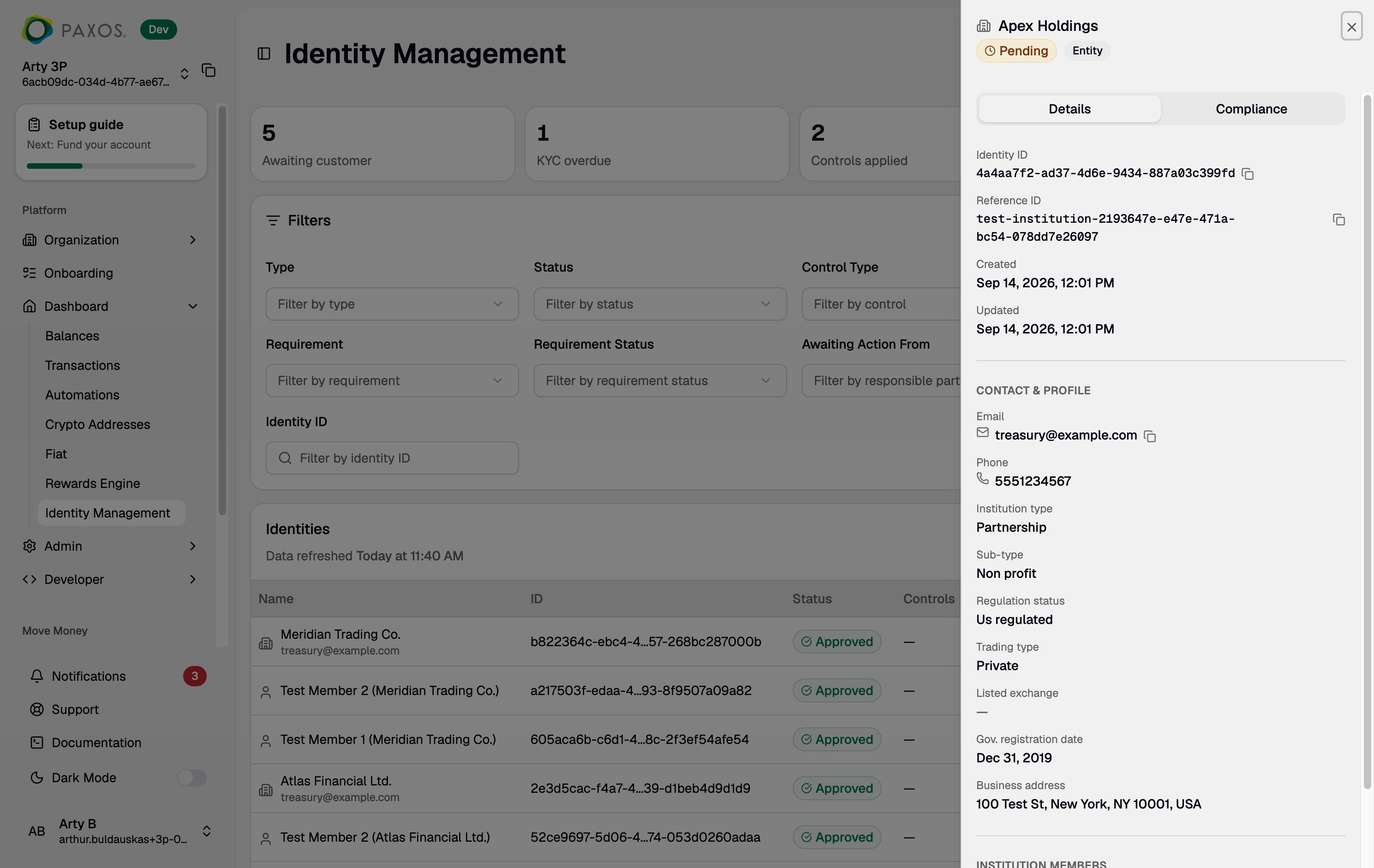
Click any row in the [identity table](/guides/dashboard/identity/browse-identities) to open the side panel. The side panel provides a detailed view of the selected identity, organized into two tabs.
 ## Side Panel Header
The header displays:
* **Name** (or redacted placeholder if you lack the PII scope)
* **Identity Type** (Person or Institution)
* **Status** badge (`PENDING`, `APPROVED`, `DENIED`, `DISABLED`, `ERROR`)
## Details Tab
The Details tab shows identifying and organizational information:
* **Identity ID** -- The full UUID. Click to copy.
* **Contact and Profile** -- Email, phone, address, and other profile fields. These are fully redacted for users without the `identity:read_identity_pii` scope.
* **Metadata** -- Creation date, last updated date, and other system fields.
* **Institution Members** -- For institution identities, a list of associated member identities (beneficial owners, control persons, etc.) with their individual statuses. Click a member to navigate to their identity details.
> For institution identities, a `MEMBERS` requirement on the parent identity means one or more members have outstanding issues. Check each member's status to find the root cause. See [The MEMBERS Requirement](/guides/identity/identity-lifecycle#the-members-requirement) for details.
## Compliance Tab
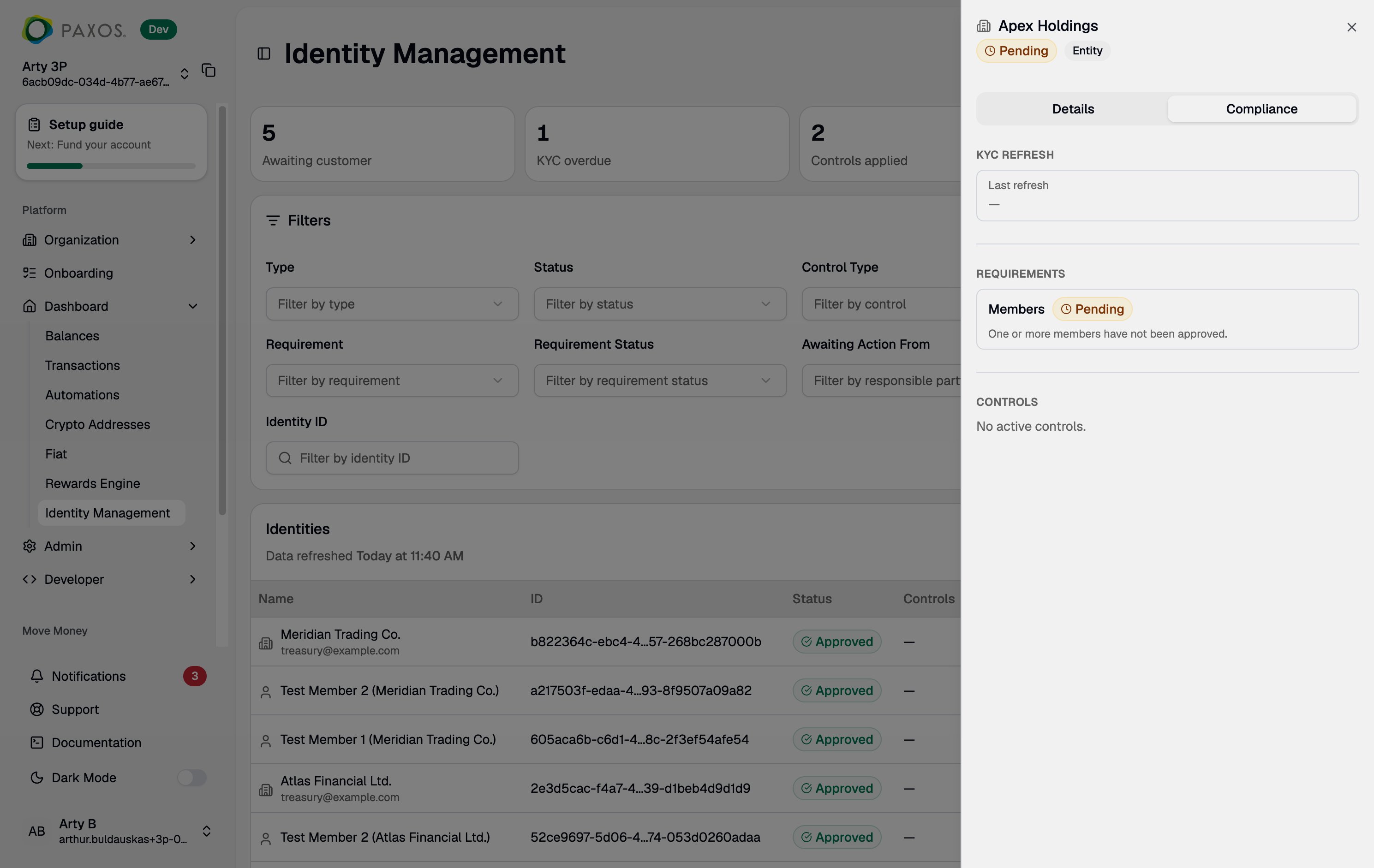
The Compliance tab shows the identity's regulatory and compliance state.
## Side Panel Header
The header displays:
* **Name** (or redacted placeholder if you lack the PII scope)
* **Identity Type** (Person or Institution)
* **Status** badge (`PENDING`, `APPROVED`, `DENIED`, `DISABLED`, `ERROR`)
## Details Tab
The Details tab shows identifying and organizational information:
* **Identity ID** -- The full UUID. Click to copy.
* **Contact and Profile** -- Email, phone, address, and other profile fields. These are fully redacted for users without the `identity:read_identity_pii` scope.
* **Metadata** -- Creation date, last updated date, and other system fields.
* **Institution Members** -- For institution identities, a list of associated member identities (beneficial owners, control persons, etc.) with their individual statuses. Click a member to navigate to their identity details.
> For institution identities, a `MEMBERS` requirement on the parent identity means one or more members have outstanding issues. Check each member's status to find the root cause. See [The MEMBERS Requirement](/guides/identity/identity-lifecycle#the-members-requirement) for details.
## Compliance Tab
The Compliance tab shows the identity's regulatory and compliance state.
 ### KYC Refresh
Displays the last KYC refresh date, if applicable. Identities with an overdue or expired refresh appear in the **KYC Refresh Overdue** stat card on the main page.
> See [Periodic KYC Refresh](/guides/identity/kyc-refresh) for how KYC refresh works and what action is needed.
### Requirements
Lists all outstanding [requirements](/guides/identity/identity-lifecycle#requirements) affecting the identity. Each entry shows:
* **Type** -- The requirement category (ID verification, screening, KYC refresh, enhanced due diligence, members, etc.).
* **Status** -- `PENDING` or `FAILED`.
* **Awaiting Action From** -- Whether Paxos or your application needs to act. Not present for `MEMBERS` requirements -- check the individual member identities instead.
Use this to determine whether you need to take action or wait for Paxos to complete processing.
### Active Controls
Lists all [controls](/guides/identity/identity-lifecycle#active-controls) currently applied to the identity, including:
* **Type** (`SELL_ONLY`, `FROZEN`, `DORMANT`, `CLOSED`)
* **Set By** -- Whether the control was applied by Paxos or by your application.
* **Reason** -- Why the control was applied.
## PII Visibility
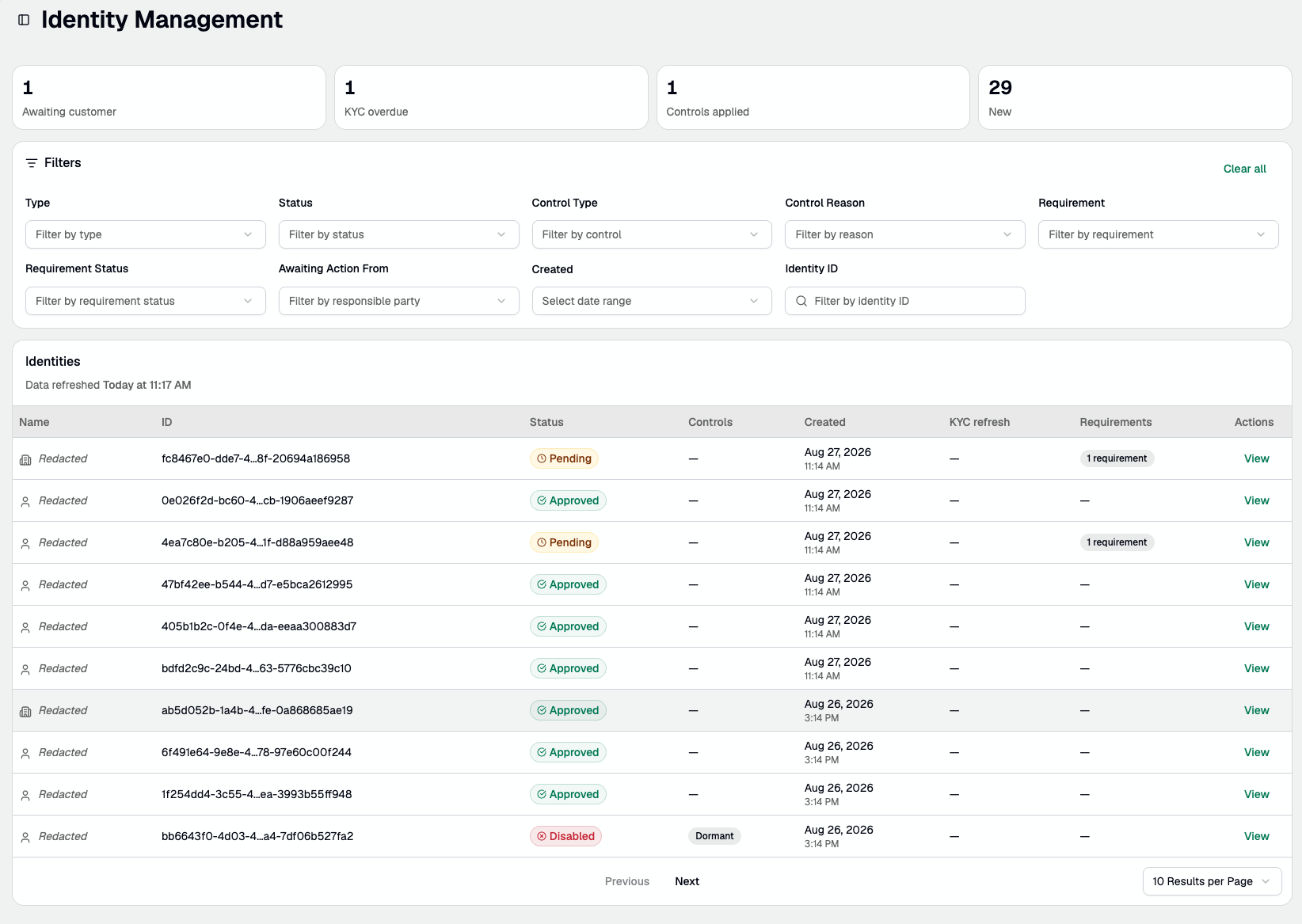
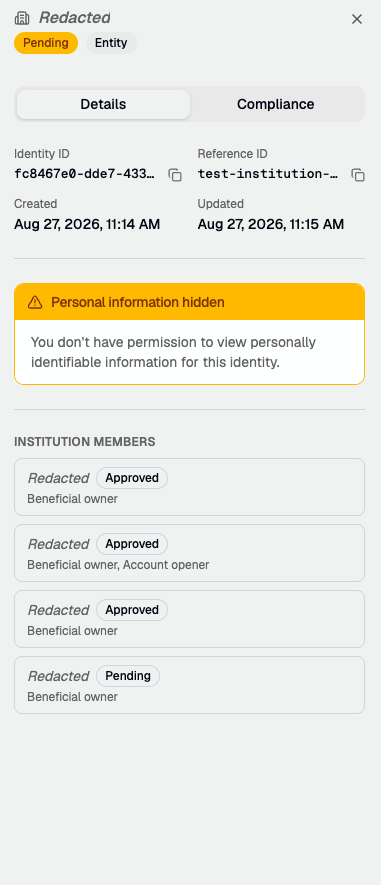
PII fields -- name, email, address, and other personally identifiable information -- are displayed based on your role's permissions. Roles without PII visibility (Viewer, Developer, Entity Manager, Organization Administrator) see these fields fully redacted throughout the page. There is no hover, click, or toggle to reveal them.
In the identity table, the Name column shows "Redacted" for every identity:
### KYC Refresh
Displays the last KYC refresh date, if applicable. Identities with an overdue or expired refresh appear in the **KYC Refresh Overdue** stat card on the main page.
> See [Periodic KYC Refresh](/guides/identity/kyc-refresh) for how KYC refresh works and what action is needed.
### Requirements
Lists all outstanding [requirements](/guides/identity/identity-lifecycle#requirements) affecting the identity. Each entry shows:
* **Type** -- The requirement category (ID verification, screening, KYC refresh, enhanced due diligence, members, etc.).
* **Status** -- `PENDING` or `FAILED`.
* **Awaiting Action From** -- Whether Paxos or your application needs to act. Not present for `MEMBERS` requirements -- check the individual member identities instead.
Use this to determine whether you need to take action or wait for Paxos to complete processing.
### Active Controls
Lists all [controls](/guides/identity/identity-lifecycle#active-controls) currently applied to the identity, including:
* **Type** (`SELL_ONLY`, `FROZEN`, `DORMANT`, `CLOSED`)
* **Set By** -- Whether the control was applied by Paxos or by your application.
* **Reason** -- Why the control was applied.
## PII Visibility
PII fields -- name, email, address, and other personally identifiable information -- are displayed based on your role's permissions. Roles without PII visibility (Viewer, Developer, Entity Manager, Organization Administrator) see these fields fully redacted throughout the page. There is no hover, click, or toggle to reveal them.
In the identity table, the Name column shows "Redacted" for every identity:
 In the side panel, contact and profile fields are hidden behind a "Personal information hidden" notice:
 If you need to view PII for an identity, ask a team member with the Treasurer, Operations, or Approver role.
## Related Resources
* [Identity Lifecycle](/guides/identity/identity-lifecycle) -- Status definitions, requirement types, and control types.
* [Identity API Reference](/api-reference/endpoints/identity/overview) -- Programmatic access to identity data.
* [Identity Controls API](/api-reference/endpoints/identity-controls/overview) -- Manage controls via API.
> Questions? Contact [Support](https://support.paxos.com).
If you need to view PII for an identity, ask a team member with the Treasurer, Operations, or Approver role.
## Related Resources
* [Identity Lifecycle](/guides/identity/identity-lifecycle) -- Status definitions, requirement types, and control types.
* [Identity API Reference](/api-reference/endpoints/identity/overview) -- Programmatic access to identity data.
* [Identity Controls API](/api-reference/endpoints/identity-controls/overview) -- Manage controls via API.
> Questions? Contact [Support](https://support.paxos.com).