> ## Documentation Index
> Fetch the complete documentation index at: https://docs.paxos.com/llms.txt
> Use this file to discover all available pages before exploring further.
# Verified Users for Sensitive Permissions
> Learn how Paxos verifies users who can initiate financial actions such as transfers, withdrawals, conversions, orchestration, and trading.
As part of Paxos’s ongoing commitment to regulatory compliance, certain user permissions in the Paxos Dashboard require identity verification (KYC). Any user who can move funds or initiate sensitive financial actions on behalf of an institution must complete KYC before those permissions become active.
This guide explains which permissions require KYC, how users complete verification, and how administrators can manage and review KYC status across their team.
KYC is performed per user, not per entity. A user only needs to complete KYC once, even if they belong to multiple entities.
***
## Why Identity Verification Is Required
Paxos is a regulated financial institution and must verify the identity of any user who can initiate asset movement or financial automation. KYC ensures that:
* Only authorized, verified team members can perform actions that move or manipulate assets
* Paxos meets regulatory requirements across multiple jurisdictions
* Institutions stay protected from unauthorized or fraudulent activity
KYC becomes required **only** when a user is assigned a role containing specific sensitive permissions.
***
## Sensitive Permissions
Any user assigned a role (standard or custom) that includes one or more of the following sensitive permissions must complete KYC.
| Category | Permission | Requires KYC |
| --------------------------- | --------------------------------------------------------- | ------------ |
| **Transfers & Withdrawals** | Make external fiat withdrawals | ✅ |
| | Make external crypto withdrawals | ✅ |
| | Transfer between Paxos profiles within the same entity | ✅ |
| | Transfer between Paxos profiles across entities | ✅ |
| **Orchestrations** | Create or delete orchestration rules | ✅ |
| | Create orchestrations | ✅ |
| **Trading** | Execute on an issuer quote for buying or selling an asset | ✅ |
***
## Sensitive Roles
* The **Treasurer** role is the only standard role that requires KYC.
* **Any Custom Role** that includes any of the sensitive permissions above will also require KYC.
If you modify an existing Custom Role to include a sensitive permission, **all users assigned to that role will be required to complete KYC immediately**.
***
## Complete Identity Verification
Users who require verification will automatically see a banner at the top of their Dashboard home page.
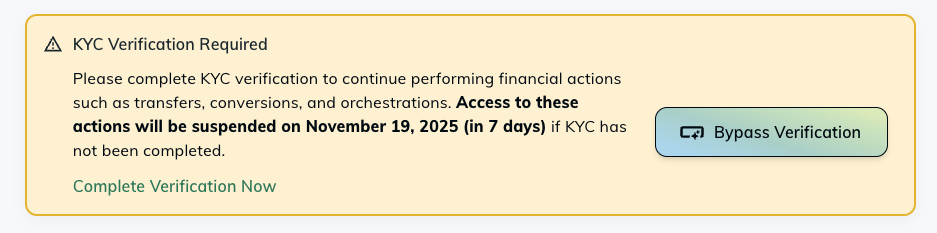 Users can complete KYC by clicking **Complete Verification Now**, which opens a Persona-hosted verification flow. Users must provide:
1. A government-issued ID
2. Confirmation of personal details
3. A proof-of-residence document dated within the last 6 months
Most users are verified instantly. Some cases may require manual review and can take up to **24 hours**.
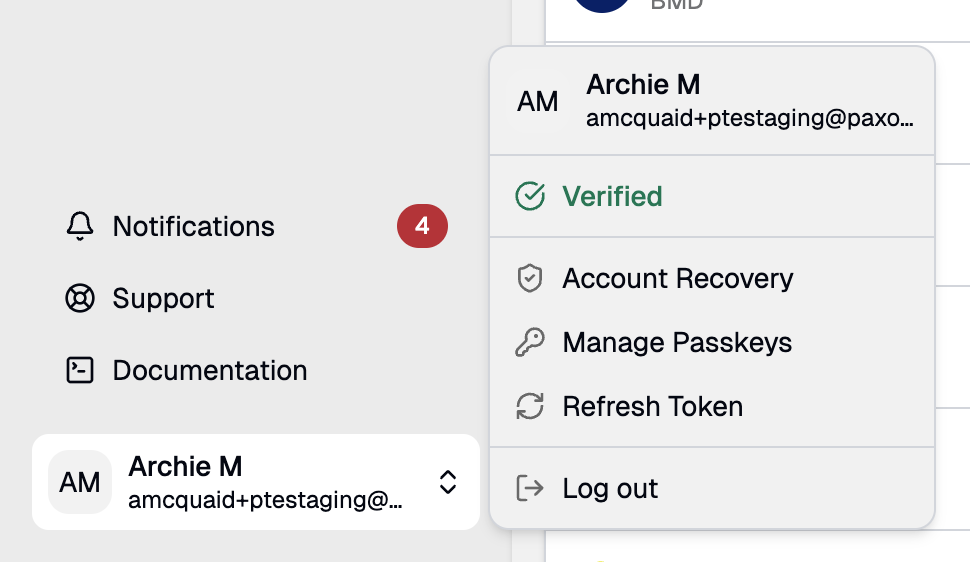
Once complete, users see a **Verified** badge in their Account menu:
Users can complete KYC by clicking **Complete Verification Now**, which opens a Persona-hosted verification flow. Users must provide:
1. A government-issued ID
2. Confirmation of personal details
3. A proof-of-residence document dated within the last 6 months
Most users are verified instantly. Some cases may require manual review and can take up to **24 hours**.
Once complete, users see a **Verified** badge in their Account menu:
 ***
## Monitor User Verification Status
Admins can monitor user verification status on the **Manage Team → Users** page.
Users who have not completed KYC appear with a **Pending Verification** indicator:
***
## Monitor User Verification Status
Admins can monitor user verification status on the **Manage Team → Users** page.
Users who have not completed KYC appear with a **Pending Verification** indicator:
 Once verified, the user’s dashboard updates automatically and all KYC-required permissions become available.
***
## Impact of Not Completing KYC
Users cannot perform any of the following actions until they complete KYC:
* Transfers (internal or cross-entity)
* Fiat or crypto withdrawals
* Stablecoin conversions
* Orchestrations
* Trading activity
If an institution has configured a compliance deadline, users will see a notice indicating when access to sensitive actions will be suspended.
If a user attempts an action requiring KYC, they will be redirected to complete verification first.
***
## Using Test Environments
In Sandbox and non-production environments, users will see a **Bypass Verification** option for testing and development:
Bypass Verification is **only** available in test environments and is never available in Production.
***
## Designing Custom Roles With KYC in Mind
When creating or updating Custom Roles:
* Adding any sensitive-permission will require KYC
* Removing sensitive-permissions removes the requirement
* Existing users assigned to a modified role may become newly required to complete KYC
**Best Practice:** Maintain at least one KYC-verified operational user at all times to avoid workflow disruptions.
For guidance on creating and managing custom roles, see [Managing Roles & Permissions](/guides/dashboard/roles).
***
## Troubleshooting
**A user completed KYC but still sees the verification banner.**\
Have them refresh the page or log out and back in. If the issue persists, contact Paxos Support.
**Can admins upload documents on behalf of users?**\
No. KYC must be completed directly by each user through Persona.
**Does a user need to re-verify if they join a new entity?**\
No. KYC is tied to the Paxos account, not the entity.\
However, they must complete KYC if they are assigned a role containing sensitive permissions.
Questions? Contact [Paxos Support](https://support.paxos.com).
***
## Related Documentation
* [Team Access](/guides/dashboard/admin/team)
* [Managing Roles & Permissions](/guides/dashboard/roles)
* [Paxos Dashboard](/guides/dashboard/index)
Once verified, the user’s dashboard updates automatically and all KYC-required permissions become available.
***
## Impact of Not Completing KYC
Users cannot perform any of the following actions until they complete KYC:
* Transfers (internal or cross-entity)
* Fiat or crypto withdrawals
* Stablecoin conversions
* Orchestrations
* Trading activity
If an institution has configured a compliance deadline, users will see a notice indicating when access to sensitive actions will be suspended.
If a user attempts an action requiring KYC, they will be redirected to complete verification first.
***
## Using Test Environments
In Sandbox and non-production environments, users will see a **Bypass Verification** option for testing and development:
Bypass Verification is **only** available in test environments and is never available in Production.
***
## Designing Custom Roles With KYC in Mind
When creating or updating Custom Roles:
* Adding any sensitive-permission will require KYC
* Removing sensitive-permissions removes the requirement
* Existing users assigned to a modified role may become newly required to complete KYC
**Best Practice:** Maintain at least one KYC-verified operational user at all times to avoid workflow disruptions.
For guidance on creating and managing custom roles, see [Managing Roles & Permissions](/guides/dashboard/roles).
***
## Troubleshooting
**A user completed KYC but still sees the verification banner.**\
Have them refresh the page or log out and back in. If the issue persists, contact Paxos Support.
**Can admins upload documents on behalf of users?**\
No. KYC must be completed directly by each user through Persona.
**Does a user need to re-verify if they join a new entity?**\
No. KYC is tied to the Paxos account, not the entity.\
However, they must complete KYC if they are assigned a role containing sensitive permissions.
Questions? Contact [Paxos Support](https://support.paxos.com).
***
## Related Documentation
* [Team Access](/guides/dashboard/admin/team)
* [Managing Roles & Permissions](/guides/dashboard/roles)
* [Paxos Dashboard](/guides/dashboard/index)