> ## Documentation Index
> Fetch the complete documentation index at: https://docs.paxos.com/llms.txt
> Use this file to discover all available pages before exploring further.
# Enhanced Due Diligence
> Manage the enhanced due diligence of an Identity on the Paxos Platform.
Enhanced Due Diligence (EDD) is triggered when an identity is deemed high risk based on Paxos's risk rating methodology. This can occur during onboarding, or during the lifecycle of an active identity — for example, if identity information changes in a way that impacts risk rating, or if suspicious transaction patterns occur on the account.
When an identity enters the EDD process, you are required to collect documentary evidence supporting the initial KYC information provided.
You can handle EDD collection using a webhook-based or polling-based approach, leveraging [Paxos Webhooks](/guides/webhooks), the [Events API](/api-reference/events), and the [Document Upload API](/api-reference/endpoints/identity-documents/document-upload).
## Webhook-based Approach
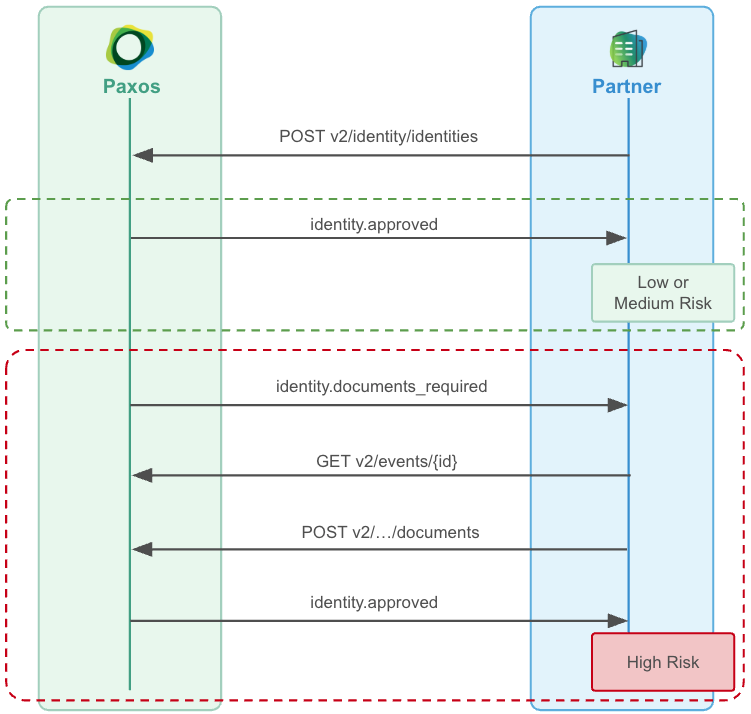 ### ➊ Consume Documents Required Events
Setup a [Webhook Consumer](/guides/webhooks/quickstart) to receive `identity.documents_required` [events](/api-reference/events) for your end users.
### ➋ Fetch Required Documents
Call [Get Event](/api-reference/endpoints/events/get-event) to fetch the event's `identity_documents_required` object, which will allow you to understand which documents are required.
### ➌ Upload the Required Documents
For the event's associated `identity_id`, call [Document Upload](/api-reference/endpoints/identity-documents/document-upload) to upload the required documents, either synchronously if you already have the documents, or asynchronously if you need to reach back out to your customer for them to provide.
### ➍ Wait for Approval or Denial
This will be followed by an `identity.approved` or `identity.denied` event based on the onboarding decision for that end user (this might take up to 1 full business day to complete).
## Polling-based Approach
### ➊ Poll for Documents Required Events
Poll [List Events](/api-reference/endpoints/events/list-events), offsetting the `created_at.gt` filter for each subsequent poll, fetching all `identity.documents_required` events.
Keep track of the [Event](/api-reference/events) IDs you've processed to ensure idempotent event handling.
### ➋ Upload the Required Documents
For the event's associated `identity_id`, call [Document Upload](/api-reference/endpoints/identity-documents/document-upload) to upload the required documents, either synchronously if you already have the documents, or asynchronously if you need to reach back out to your customer for them to provide.
### ➊ Consume Documents Required Events
Setup a [Webhook Consumer](/guides/webhooks/quickstart) to receive `identity.documents_required` [events](/api-reference/events) for your end users.
### ➋ Fetch Required Documents
Call [Get Event](/api-reference/endpoints/events/get-event) to fetch the event's `identity_documents_required` object, which will allow you to understand which documents are required.
### ➌ Upload the Required Documents
For the event's associated `identity_id`, call [Document Upload](/api-reference/endpoints/identity-documents/document-upload) to upload the required documents, either synchronously if you already have the documents, or asynchronously if you need to reach back out to your customer for them to provide.
### ➍ Wait for Approval or Denial
This will be followed by an `identity.approved` or `identity.denied` event based on the onboarding decision for that end user (this might take up to 1 full business day to complete).
## Polling-based Approach
### ➊ Poll for Documents Required Events
Poll [List Events](/api-reference/endpoints/events/list-events), offsetting the `created_at.gt` filter for each subsequent poll, fetching all `identity.documents_required` events.
Keep track of the [Event](/api-reference/events) IDs you've processed to ensure idempotent event handling.
### ➋ Upload the Required Documents
For the event's associated `identity_id`, call [Document Upload](/api-reference/endpoints/identity-documents/document-upload) to upload the required documents, either synchronously if you already have the documents, or asynchronously if you need to reach back out to your customer for them to provide.