> ## Documentation Index
> Fetch the complete documentation index at: https://docs.paxos.com/llms.txt
> Use this file to discover all available pages before exploring further.
# Periodic KYC Refresh
> Manage the periodic KYC refresh of an Identity on the Paxos Platform in an automated, compliant way.
KYC information for directly onboarded end users must be periodically re-confirmed — typically every 1-3 years — to meet regulatory requirements. Your role is to prompt your user when a refresh is requested and submit their response. Compliance review and identity access status are managed automatically.
## Events Overview
KYC refresh is driven by three events. Each event signals a status change and a clear action on your side:
| Event | Identity status | What to do |
| --------------------------------------------------------- | --------------- | ----------------------------------------------------------------- |
| [`identity.kyc_refresh.started`](/api-reference/events) | `APPROVED` | Prompt the user to confirm or update their information |
| [`identity.kyc_refresh.expired`](/api-reference/events) | `DISABLED` | User's access is restricted — prompt them to complete the refresh |
| [`identity.kyc_refresh.completed`](/api-reference/events) | `APPROVED` | Refresh is resolved, no action needed |
Use [Get Identity](/api-reference/endpoints/identity/get-identity) with the `identity_id` from the event to retrieve the user's current details — you'll need these to present to the user in the next step.
## The Refresh Flow
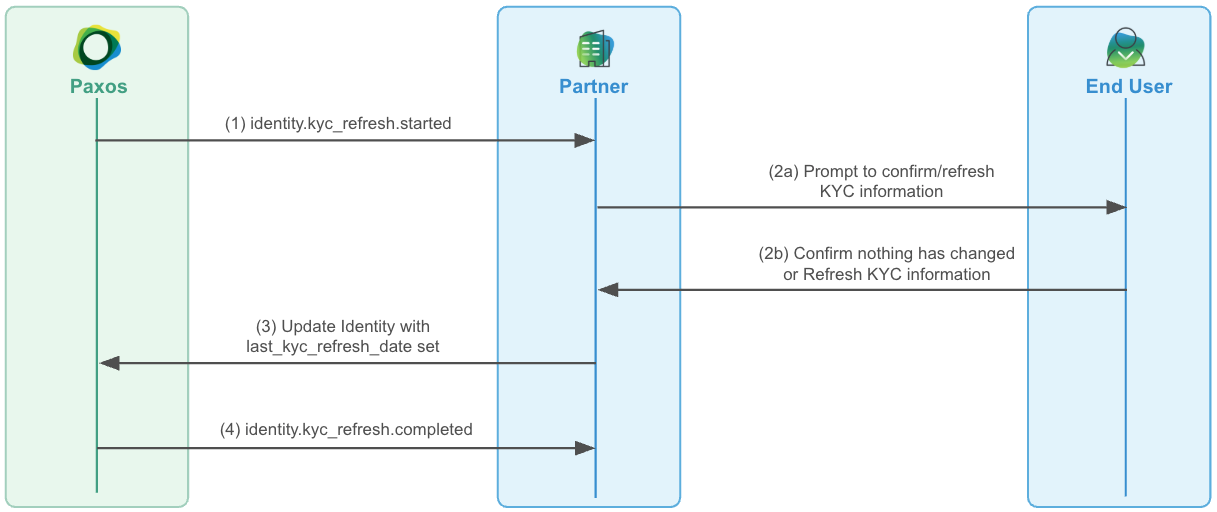 ### ➊ Receive the Started Event
When a refresh window opens, [`identity.kyc_refresh.started`](/api-reference/events) is sent. The identity remains `APPROVED` and fully functional — the user can continue transacting normally while the window is open (approximately 30 days).
### ➋ Prompt Your User
Present the user with their current KYC information and ask them to confirm it's still accurate or update anything that has changed.
### ➌ Submit the Response
Call [update-identity](/api-reference/endpoints/identity/update-identity) with `last_kyc_refresh_date` set to the timestamp the user confirmed their information:
* **No changes**: Pass only `last_kyc_refresh_date`. This is treated as confirmation nothing has changed.
* **Updated information**: Include the changed fields alongside `last_kyc_refresh_date`.
In both cases, the identity is restored to `APPROVED` and the next refresh date is set 1-3 years out once the refresh resolves. [`identity.kyc_refresh.completed`](/api-reference/events) fires to confirm resolution.
If the submission includes a [significant change](#significant-changes) such as a name or ID number, a compliance review is triggered before the refresh completes. The identity is still restored to `APPROVED` on submission, but [`identity.kyc_refresh.completed`](/api-reference/events) is delayed until the review resolves.
If the identity does not return to `APPROVED` after submission, check `status_details.requirements` for any blocking requirements and `status_details.active_controls` for any active restrictions. A requirement with `awaiting_action_from: PAXOS` indicates a review is in progress — no action is needed on your side.
## Handling Expiry
If the 30-day window closes without a response, the identity is automatically set to `DISABLED` and [`identity.kyc_refresh.expired`](/api-reference/events) fires. In this state, the user's access is fully restricted.
To restore access, prompt the user to complete the refresh and call [update-identity](/api-reference/endpoints/identity/update-identity) with `last_kyc_refresh_date`. The identity is immediately restored to `APPROVED` on submission.
**Can't use webhooks?** Poll [List Events](/api-reference/endpoints/events/list-events) using `created_at.gt` for `identity.kyc_refresh.started`, `identity.kyc_refresh.expired`, and `identity.kyc_refresh.completed` events, following the same steps above. Track processed event IDs to avoid reprocessing. Be aware that polling introduces latency — a user's identity could be `DISABLED` for hours before your job catches the expiry event.
## Reference
### Significant Changes
Submitting any of the following fields alongside `last_kyc_refresh_date` triggers a compliance review before completion:
| Identity type | Fields that require review |
| ------------- | ----------------------------------------------------------------------------------- |
| Person | `first_name`, `middle_name`, `last_name`, `cip_id`, `cip_id_type`, `cip_id_country` |
| Institution | `name`, `doing_business_as`, `cip_id` |
The identity remains `APPROVED` during review — the user can continue transacting. To detect this state programmatically, check `status_details.requirements` for a `KYC_REFRESH` entry with `awaiting_action_from: PAXOS`. [`identity.kyc_refresh.completed`](/api-reference/events) fires once the review is resolved.
### Backdating the Refresh Date
If you have a historical record of when a user last completed KYC, you can pass that date directly as `last_kyc_refresh_date` — it is accepted without requiring a full refresh flow.
If the date is older than the user's refresh period, an [`identity.kyc_refresh.started`](/api-reference/events) event fires immediately, opening a new refresh window.
### ➊ Receive the Started Event
When a refresh window opens, [`identity.kyc_refresh.started`](/api-reference/events) is sent. The identity remains `APPROVED` and fully functional — the user can continue transacting normally while the window is open (approximately 30 days).
### ➋ Prompt Your User
Present the user with their current KYC information and ask them to confirm it's still accurate or update anything that has changed.
### ➌ Submit the Response
Call [update-identity](/api-reference/endpoints/identity/update-identity) with `last_kyc_refresh_date` set to the timestamp the user confirmed their information:
* **No changes**: Pass only `last_kyc_refresh_date`. This is treated as confirmation nothing has changed.
* **Updated information**: Include the changed fields alongside `last_kyc_refresh_date`.
In both cases, the identity is restored to `APPROVED` and the next refresh date is set 1-3 years out once the refresh resolves. [`identity.kyc_refresh.completed`](/api-reference/events) fires to confirm resolution.
If the submission includes a [significant change](#significant-changes) such as a name or ID number, a compliance review is triggered before the refresh completes. The identity is still restored to `APPROVED` on submission, but [`identity.kyc_refresh.completed`](/api-reference/events) is delayed until the review resolves.
If the identity does not return to `APPROVED` after submission, check `status_details.requirements` for any blocking requirements and `status_details.active_controls` for any active restrictions. A requirement with `awaiting_action_from: PAXOS` indicates a review is in progress — no action is needed on your side.
## Handling Expiry
If the 30-day window closes without a response, the identity is automatically set to `DISABLED` and [`identity.kyc_refresh.expired`](/api-reference/events) fires. In this state, the user's access is fully restricted.
To restore access, prompt the user to complete the refresh and call [update-identity](/api-reference/endpoints/identity/update-identity) with `last_kyc_refresh_date`. The identity is immediately restored to `APPROVED` on submission.
**Can't use webhooks?** Poll [List Events](/api-reference/endpoints/events/list-events) using `created_at.gt` for `identity.kyc_refresh.started`, `identity.kyc_refresh.expired`, and `identity.kyc_refresh.completed` events, following the same steps above. Track processed event IDs to avoid reprocessing. Be aware that polling introduces latency — a user's identity could be `DISABLED` for hours before your job catches the expiry event.
## Reference
### Significant Changes
Submitting any of the following fields alongside `last_kyc_refresh_date` triggers a compliance review before completion:
| Identity type | Fields that require review |
| ------------- | ----------------------------------------------------------------------------------- |
| Person | `first_name`, `middle_name`, `last_name`, `cip_id`, `cip_id_type`, `cip_id_country` |
| Institution | `name`, `doing_business_as`, `cip_id` |
The identity remains `APPROVED` during review — the user can continue transacting. To detect this state programmatically, check `status_details.requirements` for a `KYC_REFRESH` entry with `awaiting_action_from: PAXOS`. [`identity.kyc_refresh.completed`](/api-reference/events) fires once the review is resolved.
### Backdating the Refresh Date
If you have a historical record of when a user last completed KYC, you can pass that date directly as `last_kyc_refresh_date` — it is accepted without requiring a full refresh flow.
If the date is older than the user's refresh period, an [`identity.kyc_refresh.started`](/api-reference/events) event fires immediately, opening a new refresh window.