> ## Documentation Index
> Fetch the complete documentation index at: https://docs.paxos.com/llms.txt
> Use this file to discover all available pages before exploring further.
# Overview
> Accept stablecoin pay-ins with real-time settlement. Issue on-chain refunds.
## Get Started
Accept stablecoin pay-ins with real-time settlement. Issue on-chain refunds.
Learn more about payment statuses.
Get answers to common questions about payments.
Use the Paxos APIs to effortlessly integrate stablecoin payment acceptance into your platform.
Features include:
* Accept PYUSD, USDC and USDP payments via on-chain transfers.
* Automatically convert the stablecoin to fiat, or opt to hold balances in stablecoin.
* Reconcile transactions on the Paxos Platform.
* Settle USD directly to your bank account.
* Issue refunds to the original Buyer via stablecoin on-chain transfers.
In the documentation, a payment is considered to be the total amount processed, including both the incoming payment (pay-in) and returned payment (refund).
## Pay-ins Workflow
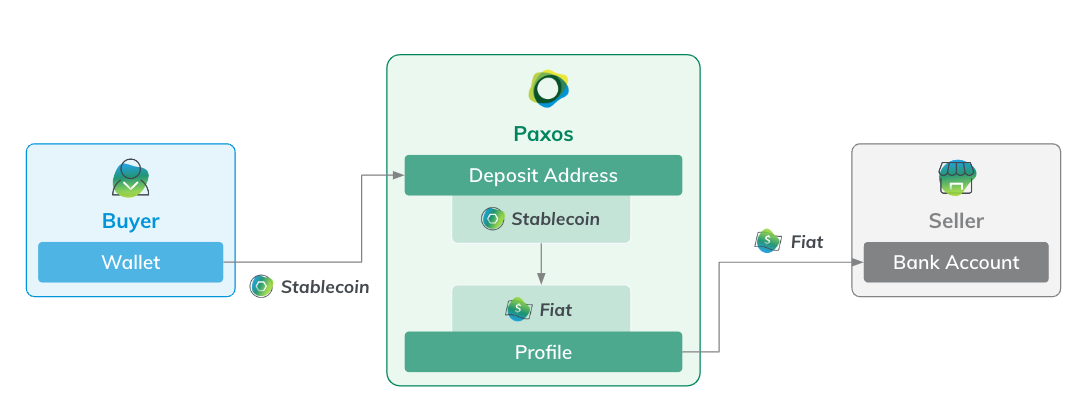 The pay-ins workflow involves two key personas: a Buyer purchasing goods or services using stablecoins and a Seller.
The Seller represents either a merchant that provides goods or services, or a payment processor acting as the intermediary to facilitate the transaction.
Most pay-in integrations follow a similar workflow for the Seller:
1. [Add a crypto deposit address](/guides/payments/quickstart#pay-in-add-deposit-address) for a designated Profile, using one of the [supported blockchains](/guides/payments/faq#supported-assets).
2. To [use stablecoins for pay-ins](/guides/payments/quickstart#receive-payment), share the crypto deposit address with Buyers as a checkout option.
Using a wallet connector or displaying a QR code in the Buyer interface helps to ensure that Buyers send the correct amount and avoid errors.
1. Configure a [pay-in monitoring and reconciliation](/guides/payments/quickstart#pay-in-monitor-reconcile) request to confirm Pay-in transactions on the Paxos Platform.
2. [Withdraw USD](/guides/payments/quickstart#pay-in-withdraw-fiat) to a bank account.
## Refunds Workflow
Issuing a refund is similar to pay-ins, except the funding flow is reversed: USD is first moved onto the Paxos Platform and then the stablecoin refund is sent to the Buyer's designated wallet.
Most refund integrations follow a similar workflow for the Seller:
1. [Send USD](/guides/payments/quickstart#refund-fund-account) to a designated refund account.
2. [Initiate a crypto withdrawal](/guides/payments/quickstart#refund-initiate) to the Buyer's designated wallet address, using one of the [supported blockchains](/guides/payments/faq#supported-assets).
3. Configure a [refund monitoring and reconciliation](/guides/payments/quickstart#refund-monitor-reconcile) request to confirm Pay-in transactions on the Paxos Platform.
The pay-ins workflow involves two key personas: a Buyer purchasing goods or services using stablecoins and a Seller.
The Seller represents either a merchant that provides goods or services, or a payment processor acting as the intermediary to facilitate the transaction.
Most pay-in integrations follow a similar workflow for the Seller:
1. [Add a crypto deposit address](/guides/payments/quickstart#pay-in-add-deposit-address) for a designated Profile, using one of the [supported blockchains](/guides/payments/faq#supported-assets).
2. To [use stablecoins for pay-ins](/guides/payments/quickstart#receive-payment), share the crypto deposit address with Buyers as a checkout option.
Using a wallet connector or displaying a QR code in the Buyer interface helps to ensure that Buyers send the correct amount and avoid errors.
1. Configure a [pay-in monitoring and reconciliation](/guides/payments/quickstart#pay-in-monitor-reconcile) request to confirm Pay-in transactions on the Paxos Platform.
2. [Withdraw USD](/guides/payments/quickstart#pay-in-withdraw-fiat) to a bank account.
## Refunds Workflow
Issuing a refund is similar to pay-ins, except the funding flow is reversed: USD is first moved onto the Paxos Platform and then the stablecoin refund is sent to the Buyer's designated wallet.
Most refund integrations follow a similar workflow for the Seller:
1. [Send USD](/guides/payments/quickstart#refund-fund-account) to a designated refund account.
2. [Initiate a crypto withdrawal](/guides/payments/quickstart#refund-initiate) to the Buyer's designated wallet address, using one of the [supported blockchains](/guides/payments/faq#supported-assets).
3. Configure a [refund monitoring and reconciliation](/guides/payments/quickstart#refund-monitor-reconcile) request to confirm Pay-in transactions on the Paxos Platform.