

Events Overview
KYC refresh is driven by three events. Each event signals a status change and a clear action on your side:The Refresh Flow
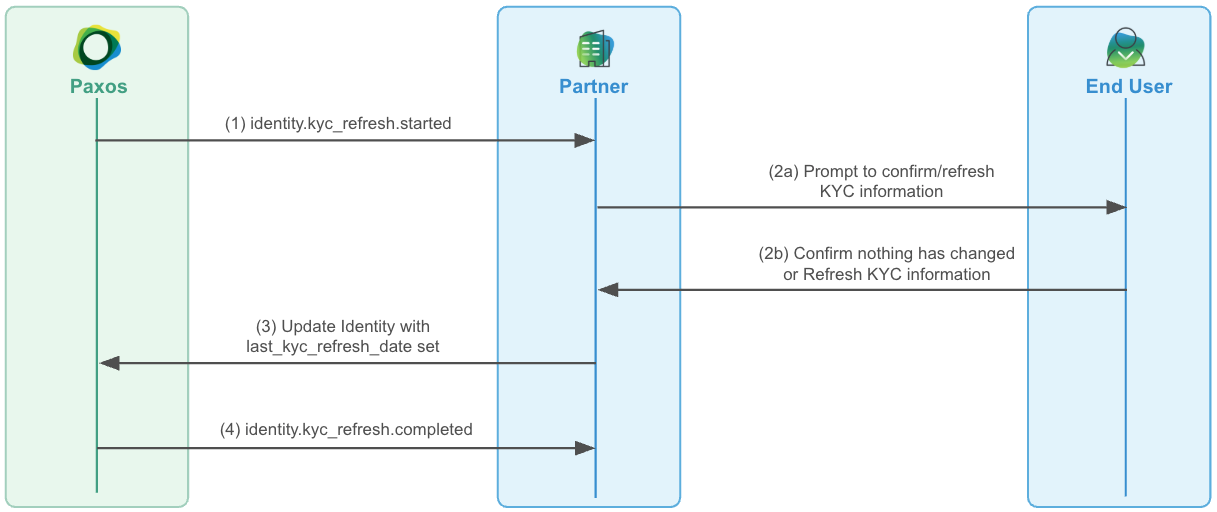
➊ Receive the Started Event
When a refresh window opens,identity.kyc_refresh.started is sent. The identity remains APPROVED and fully functional — the user can continue transacting normally while the window is open (approximately 30 days).
➋ Prompt Your User
Present the user with their current KYC information and ask them to confirm it’s still accurate or update anything that has changed.➌ Submit the Response
Call update-identity withlast_kyc_refresh_date set to the timestamp the user confirmed their information:
- No changes: Pass only
last_kyc_refresh_date. This is treated as confirmation nothing has changed. - Updated information: Include the changed fields alongside
last_kyc_refresh_date.
APPROVED and the next refresh date is set 1-3 years out once the refresh resolves. identity.kyc_refresh.completed fires to confirm resolution.
If the submission includes a significant change such as a name or ID number, a compliance review is triggered before the refresh completes. The identity is still restored to
APPROVED on submission, but identity.kyc_refresh.completed is delayed until the review resolves.Handling Expiry
If the 30-day window closes without a response, the identity is automatically set toDISABLED and identity.kyc_refresh.expired fires. In this state, the user’s access is fully restricted.
To restore access, prompt the user to complete the refresh and call update-identity with last_kyc_refresh_date. The identity is immediately restored to APPROVED on submission.
Can’t use webhooks? Poll List Events using
created_at.gt for identity.kyc_refresh.started, identity.kyc_refresh.expired, and identity.kyc_refresh.completed events, following the same steps above. Track processed event IDs to avoid reprocessing. Be aware that polling introduces latency — a user’s identity could be DISABLED for hours before your job catches the expiry event.Reference
Significant Changes
Submitting any of the following fields alongsidelast_kyc_refresh_date triggers a compliance review before completion:
The identity remains
APPROVED during review — the user can continue transacting. To detect this state programmatically, check status_details.requirements for a KYC_REFRESH entry with awaiting_action_from: PAXOS. identity.kyc_refresh.completed fires once the review is resolved.
Backdating the Refresh Date
If you have a historical record of when a user last completed KYC, you can pass that date directly aslast_kyc_refresh_date — it is accepted without requiring a full refresh flow.