

Webhook-based Approach
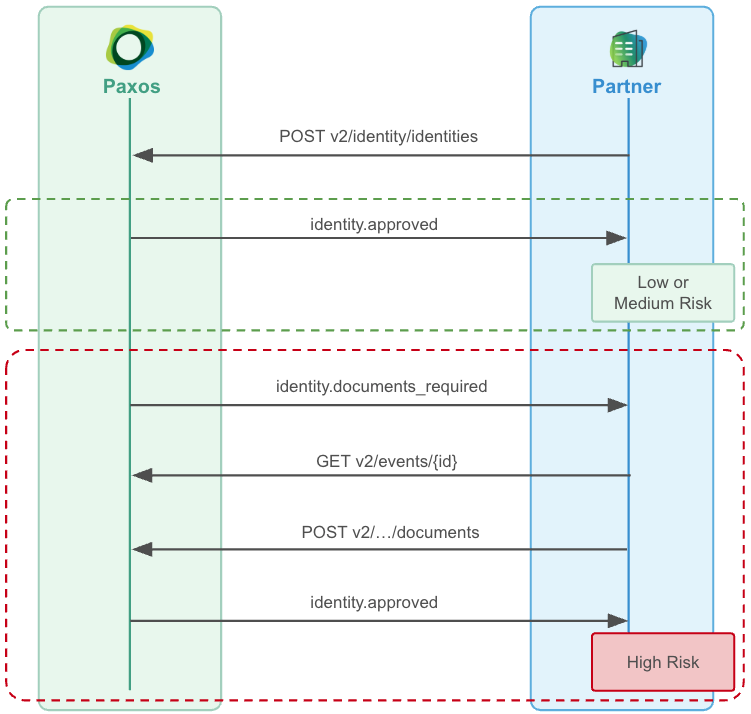
➊ Consume Documents Required Events
Setup a Webhook Consumer to receiveidentity.documents_required events for your end users.
➋ Fetch Required Documents
Call Get Event to fetch the event’sidentity_documents_required object. Use the documents array to build the document checklist for your end user.
Each entry in documents includes:
The flatrequired_documentsarray is deprecated. It lists required document types only; usedocumentsinstead, which also covers optional documents and carries per-document metadata.
➌ Upload the Required Documents
For the event’s associatedidentity_id, call Document Upload to upload each document, either synchronously if you already have the documents, or asynchronously if you need to reach back out to your customer.
To track progress, call List Identity Documents. Each entry covers one uploaded file (or a still-missing requirement) via its document_types array — a single file can satisfy more than one requested type — and carries a status field reflecting its current upload state:
status is omitted from an entry when its upload state cannot be determined — treat a missing status as an unresolved requirement, not as a contract violation.
Each entry always includes a required flag (false means optional; an entry covering multiple types is required if any of them is). Some entries showing PENDING_UPLOAD also include an upload_link you can use to upload the file directly — it’s present only while the underlying upload is awaiting file bytes and its window has not expired, not for every PENDING_UPLOAD entry. Re-upload any document showing REJECTED_UPLOAD.
status is available only via the List Identity Documents API — it is not included in the event payload. The event tells you which documents are requested; the API tells you their current state. COMPLETED_UPLOAD reflects successful storage processing, not compliance acceptance of the document.➍ Wait for the EDD Outcome
When Paxos’s review of the submitted documents reaches an outcome, it emits one of the following:identity.documents_accepted— The EDD review concluded successfully.identity.documents_denied— The EDD review resulted in a denial.
identity_edd object from Get Event. Treat these as the signal to act on when they arrive, but do not treat them as a guaranteed terminator — a review can also be closed with no accepted or denied event. If you have not received one within the expected review window, reconcile by checking the identity’s status and outstanding requirements rather than waiting indefinitely.
A separate overall identity-status event may also fire, but only when the identity’s status actually changes as a result. Which event fires depends on the identity’s status when EDD was triggered:
EDD review may take up to one full business day to complete.
Polling-based Approach
➊ Poll for Documents Required Events
Poll List Events, offsetting thecreated_at.gt filter for each subsequent poll, fetching all identity.documents_required events.
Keep track of the Event IDs you’ve processed to ensure idempotent event handling.
➋ Upload the Required Documents
For the event’s associatedidentity_id, call Document Upload to upload the required documents. Poll List Identity Documents to monitor the status of each document, and re-upload any showing REJECTED_UPLOAD.
➌ Poll for the EDD Outcome
Poll List Events foridentity.documents_accepted or identity.documents_denied to determine the outcome of the review.
Requirement Changes During an In-Flight EDD
If the documents required for an in-flight EDD change — for example, because the compliance configuration for your integration is updated — Paxos re-emitsidentity.documents_required for that identity. The re-emitted event reflects the current, complete set of requested documents.
When you receive a subsequent identity.documents_required event for the same identity:
- Fetch the updated event object using Get Event and re-display the checklist from the
documentsarray. - Call List Identity Documents and check the
statusof each entry. - Upload any document that is
NOT_STARTED,PENDING_UPLOAD,REJECTED_UPLOAD, or missing astatusto resume the review.
Questions? Contact Support.