

Example tier configuration
Supported operations
Tiers are available for:- Crypto withdrawals
- Fiat withdrawals
- Internal transfers (between your own Paxos entities)
Setting up tiers
➊ Navigate to Approvals
Go to Admin > Approvals and click Edit on a supported operation.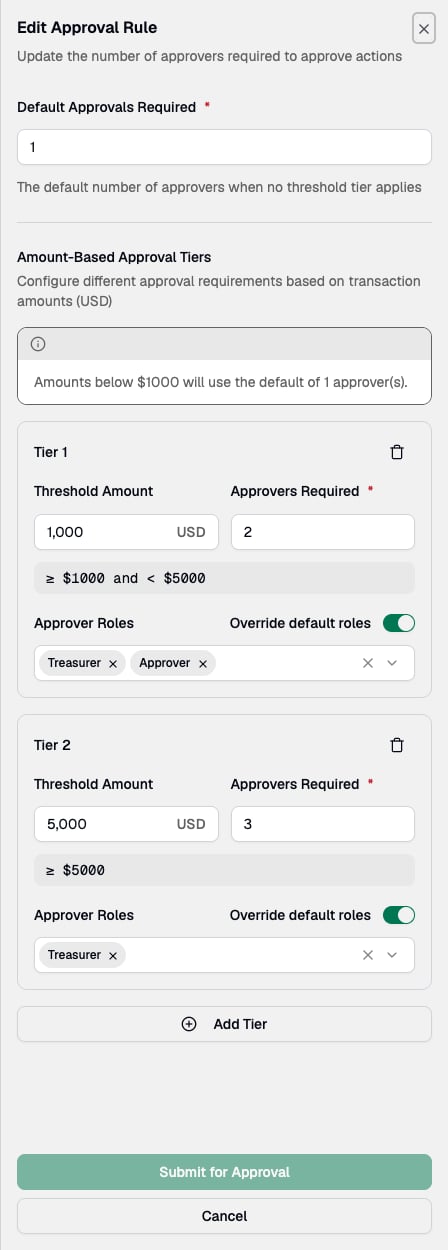
➋ Set the default approver count
Configure the default number of approvers. This applies to amounts below your first tier threshold.➌ Add a tier
Click Add Tier and enter:- A USD threshold amount
- The number of approvers required for that tier
➍ Add additional tiers
Add more tiers as needed. Each threshold must be higher than the previous one.➎ Submit for approval
Click Submit for Approval. Another user must approve the policy change before it takes effect. To review a rule’s tiers without editing it, click View on the operation. The Amount-Based Tiers section lists each amount range with its approver count and roles.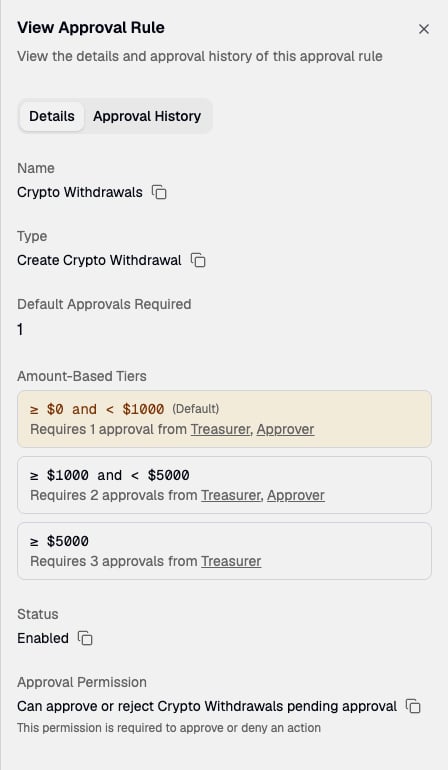
How amounts are evaluated
Transactions are matched against tiers by their USD value:- Below first tier threshold: Uses the default approver count
- At or above a tier threshold: Uses that tier’s approver count
Constraints
- Each tier’s threshold must be strictly greater than the previous tier’s
- Approver count per tier cannot exceed the number of users with the approver role
- You cannot add a new tier until the current one has a threshold amount set
- If your first tier starts above $0, a banner reminds you that lower amounts fall back to the default
Per-tier approver roles
By default, any user whose role includes the relevant approval permission can approve transactions across all tiers. You can optionally restrict which roles are allowed to approve on a per-tier basis.How it works
Each tier can override the default approver roles. When an override is active, only users with the selected roles can approve transactions that fall within that tier’s amount range. Tiers without overrides continue to use the default roles.
In this example, anyone with the approval permission can approve transactions under $1,000. Transactions between $1,000 and $4,999 require two approvals from users with the Treasury Manager or Compliance Officer role. Transactions of $5,000 or more require three approvals, all from users with the Treasury Manager role.
Restricting roles on a tier
➊ Edit a tier
Go to Admin > Approvals and click Edit on a supported operation.➋ Toggle the override
On the tier you want to restrict, enable Override default roles.➌ Select roles
Choose one or more roles from the dropdown. Only roles that have the relevant approval permission for that operation type are shown.➍ Submit for approval
Click Submit for Approval. Another user must approve the policy change before it takes effect.Constraints
- You can only select roles that have the relevant approval permission for the operation type
- At least one role must be selected when overriding default roles
- Tiers without overrides use the default roles — any user with the approval permission can approve